How to use?
You should create several clothing sets for each destination, weather and temperature. Take your digital camera and create photos of all your clothes. Now, you can settle on what to wear using our computer program.
Select an empty row in the Clothing sets table. Double click on the field "Clothing sets description" and type a name of your new set , for example "Set for restaurant". Then select a destination from the drop down list. You can enter a new destination if don't find it in the destination list. Select or enter weather and temperature for this set. You should define all garments for this set in the table "Clothes for set". You can select items from the drop down list or enter a new dress using the right small button "Edit and Add clothes". Select option at the pop up form for Add or Edit. Enter a garment description and load a photo from your image file. You can enter a category and a location for this item. If you want to remove any item from the set you can use the left small button "Remove item".
Click on the button "All clothes" and you'll see list of all your clothes. You can edit,add and delete clothes and use filters by category and by location. You see when and how many times you dressed each item. Click on the button "Select" and add a garment to the current clothing set.
You can save when you dressed this set. Use the special table "When dressed" . Select an empty row and select date from the calendar.
Clothing sets
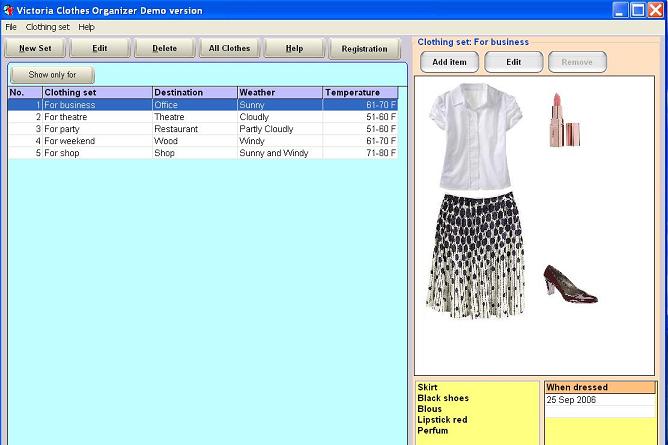
The Clothing sets is a main program form. It has the list of clothing sets, the filter panel, the tables "When dressed" and "Clothes for set" and the image of a clothing set. The buttons New Set and Delete Set. Double click on any row for editing. Select the row "---All----" if you want to see all records .Set an appropriate destination, weather and temperature if you want to see the limited amount of clothing sets. You can edit , add and delete any destination, weather and temperature using the right small buttons. You should define the destination, weather and temperature for each set using drop down list or enter a new value in the text box.Define clothes for clothing set in the table "Clothes for set". You can select items from the drop down list or enter a new dress using the right small button "Edit and Add clothes". Select an option at the pop up for Add or Edit. Enter a cloth description and load a photo from your image file. You can enter a category and a location for this item. If you want to remove item from the set you can use the left small button "Remove item". Use the table "When dressed" for tracking date . Select an empty row and select date from the calendar.
Click on a column header for sorting the clothing sets list.
Garment Edit form
When you show this form from an empty table row you'll be able to add a new garment. If you run form from not empty item you will be able to edit information of an existing item. The garment Edit form has the next fields : Category,Purchase date, Cost, Location, Comments. You can add a photo of the dress using the button Image. Select an image file from any device and click the button Open. The program will save this image in the database.

List of all clothes
The "All clothes" form has the list with garments, the filter panel, the tables "When dressed" and "Using in Clothing sets" and the image . The buttons New, Delete and Select garment. Double click on any row for editing. Select the row "---All----" if you want to see all records .Set any appropriate category and location if you want to see a limited amount of clothes. You can edit , add and delete category and location using the right small buttons. You can define a category and location for each item using the drop down list or enter a new value in the text box.
Click on a column header for sorting the garments list.

Edit form for destinations,weather,temperature, locations and categories.
You'll see these forms if you click on smal buttons. First of all, you see the panel with the options Add,New and Delete. Select the option New and enter new description or select the option Edit and change the item description. If you select the delete option the program will delete a current record.
You can define what to wear for any case.

| 
 Clothing Organizer
 What should I wear?
 — Download Victoria's Clothes Organizer