|
|
Golden Inventory Synchro |
|
Currency |
Another inventory software Content Top Previous |
|
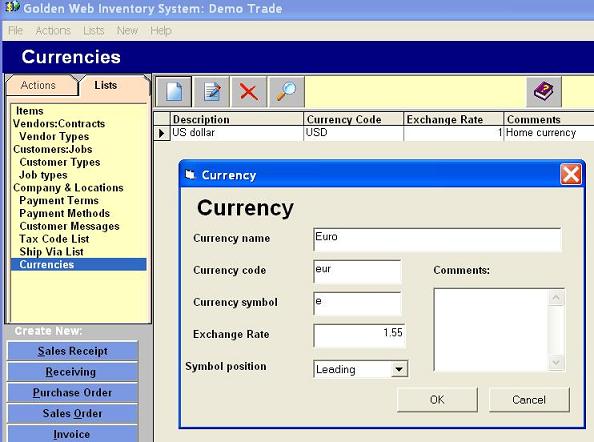
The Golden Inventory Synchro is multi-currencies system. You can select any currency for new Invoice,Sales or Purchase Order and Receipt using drop down list of Currencies. If you want add a new currency use left menu Lists-Currencies. You have to enter a current exchange rate in appropriate field. The first currency using as home currency and you define exchange rate for the home currency. System uses the home currency for item prices and reports. The Currency list allows to manage creating, editing, deleting, sorting, filtering currencies . You can get to the Currency by clicking the row "Currencies" in the left menu List.
To add of a new currency click on the button "New" at the Currency list form. Fields: Currency Name Full name of currency
Currency Code Short name of currency : USD, EUR, CAD . System uses this code in the drop down Currency list.
Currency symbol Currency symbol for printing total amount.
Exchange rate Default exchange rate.You have to enter a real current exchange rate when your create invoice or order.
Symbol position Define position of currency symbol.
|